
You know the look: letters cut out of magazines and newspapers, glued onto a sheet of paper, every one a different size and font. Kidnappers in old movies used it. Punk zines used it. And it still works great for anything that should feel loud, hand-made and a little bit rebellious – event pages, band sites, fan pages, indie product launches.
Carrd’s font picker won’t help you here. It’s Google Fonts, and Google Fonts has exactly zero proper ransom note fonts. So you have two options, and this post covers both:
- Use a real ransom note font file. We picked 8 free ones below (and checked whether you’re actually allowed to put them on a website).
- Skip the download and generate the effect. A small script that turns any Carrd headline into a ransom note, using fonts Carrd already has.
Who is this for?
- Personal sites, fan pages, link-in-bio pages, event and party pages, anything with a punk, DIY or true-crime vibe
- Band, podcast and zine sites
- Halloween pages, escape room and mystery party invites
- You’ll need Carrd Pro Standard or higher for both routes – custom code needs it (see Carrd’s docs on embedding custom code)
Not for your accounting firm. Well, unless your accounting firm is cool.
First, a word about licenses
Most ransom note fonts come from free font sites, and “free for commercial use” there usually means: you can install the font on your computer and make graphics with it. Putting the font file on a website (that’s what we’ll do in Carrd) is a different use, and some authors want a separate webfont license for it.
We read the license file that ships with each font below and only kept fonts where web use is allowed – or, in one case, flagged the exception. Still, licenses change. Open the readme in the zip before you upload anything.
The 8 best free ransom note fonts
🏆 Ransom (Divide By Zero)
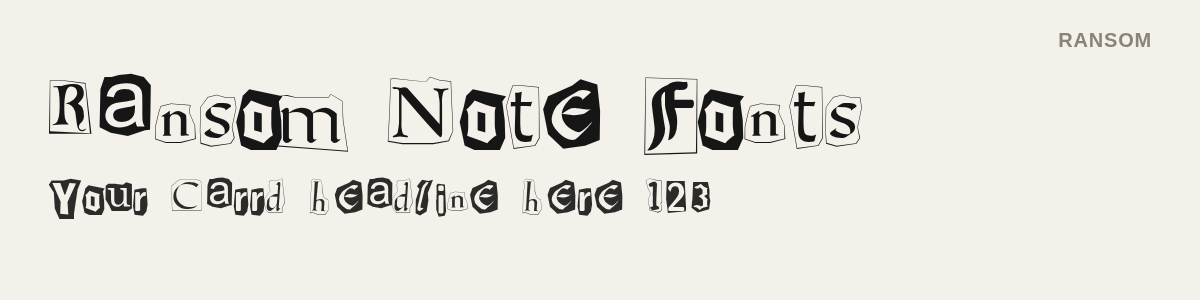
The classic. Every letter is pulled from a different typeface, some inverted white-on-black, and the mix has upper- and lowercase plus numbers. If you only try one font from this list, try this one.
- License: free for anything except reselling the file (the author says so in the readme, and means it)
- Download Ransom on 1001 Fonts
Kingthings Extortion
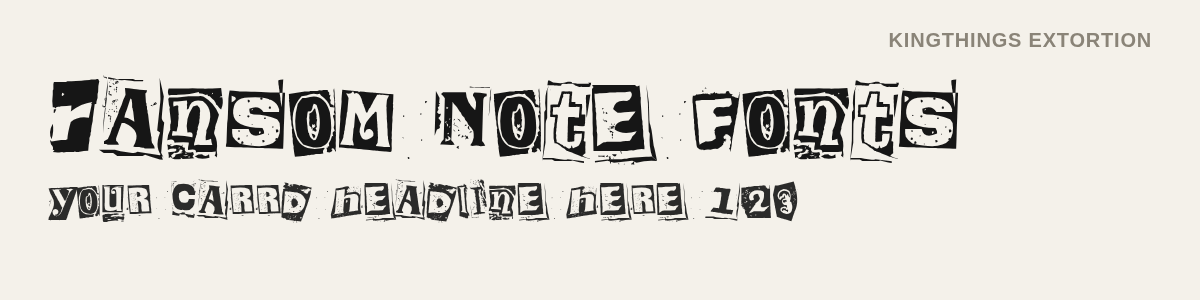
Looks like the letters were ripped out rather than cut – rough paper edges, uneven ink. Caps only. Very readable for how messy it is, which makes it a good headline font.
- License: “free for you to use for any purpose you wish” (Kingthings EULA)
- Download Kingthings Extortion on 1001 Fonts
Earwig Factory
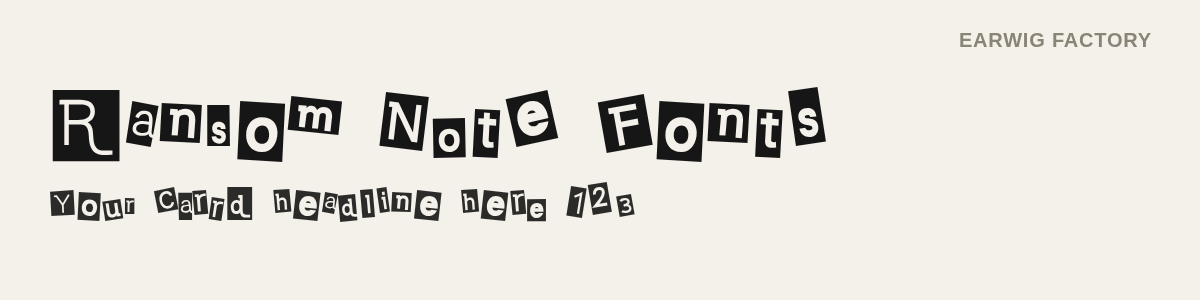
Probably the most famous ransom font on the internet – you’ve seen it on posters and YouTube thumbnails. Clean edges, tidy blocks, good numbers.
- ⚠️ License: the free version is a desktop license only. Web embedding needs a paid webfont license from Typodermic. So: great for header images you upload to Carrd, not for the @font-face method below.
- Download Earwig Factory on 1001 Fonts
Xerography
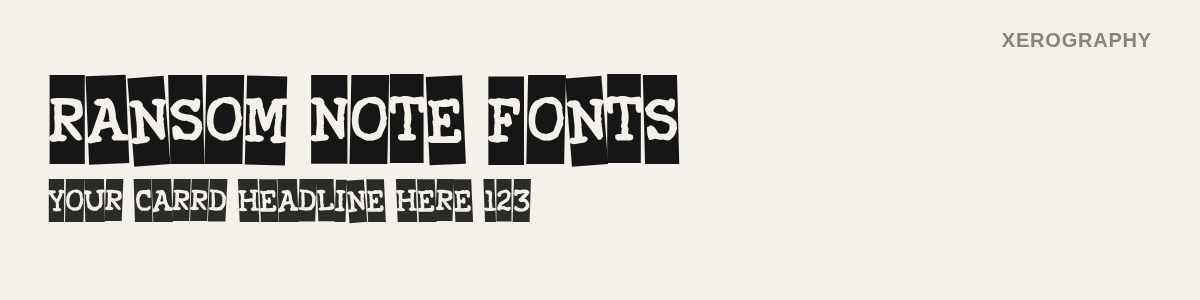
Heavy caps on black blocks, like a badly photocopied flyer. The loudest font on this list. Works best in short, all-caps headlines.
- License: 1001 Fonts Free For Commercial Use license, which explicitly allows webfont conversion and embedding
- Download Xerography on 1001 Fonts
Fanzine
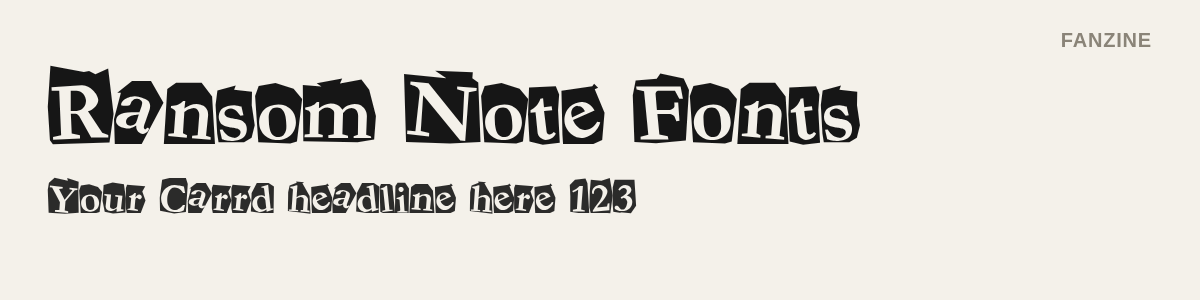
Less “kidnapper”, more “1980s punk fanzine”. The letters are all from one heavy typeface, just cut out and pasted at odd angles. Chunky and friendly.
- License: freeware, may be used freely as long as it’s not sold
- Download Fanzine on 1001 Fonts
Paper Cut
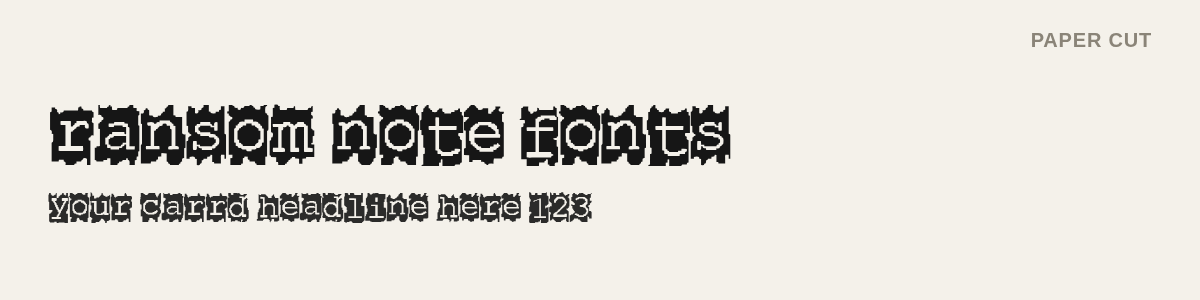
The only lowercase-first font here. Jagged paper scraps around every letter, slightly softer than the rest. Nice for a cute-but-edgy look.
- License: freeware, and the author literally says “feel free to use it on your websites”
- Download Paper Cut on 1001 Fonts
Phorssa
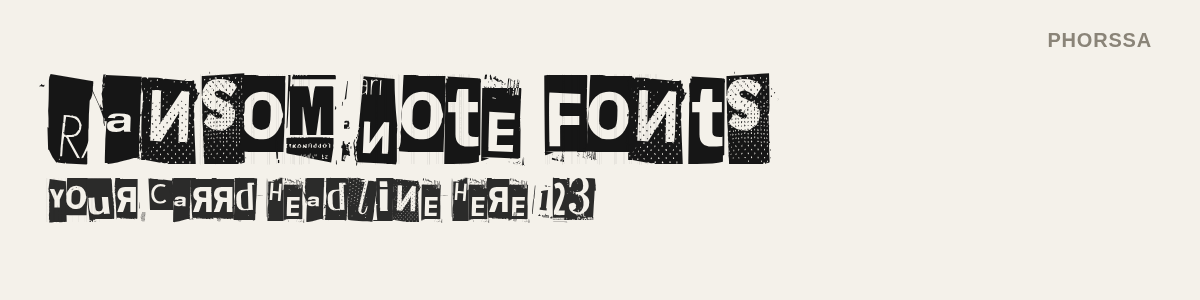
Halftone dots, mirrored letters, actual scraps of newsprint in the background. The most “real” looking one – it’s clearly cut from a newspaper. Also the hardest to read, so keep it big.
- License: free for commercial and non-commercial designs, not to be sold (junkohanhero readme)
- Download Phorssa on 1001 Fonts
World Tour
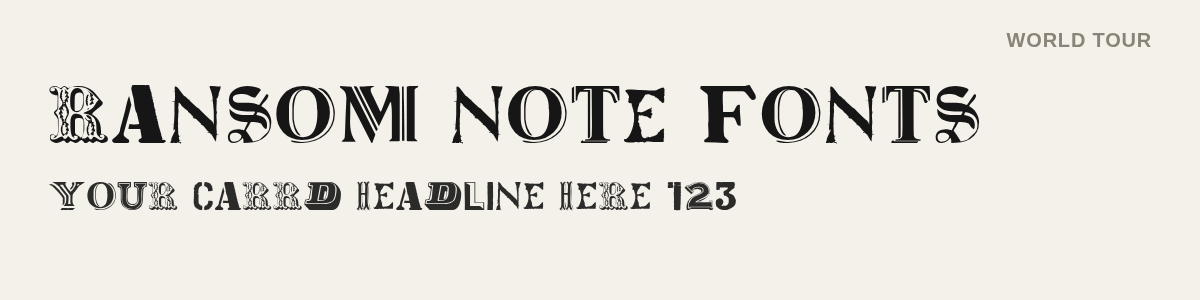
No paper blocks at all – just a different vintage typeface for every letter. Caps only. If the other fonts are too much, this is the tasteful version.
- License: public domain
- Download World Tour on 1001 Fonts
How to use a ransom note font in Carrd
Carrd can’t upload font files, so the font has to live somewhere else on the internet. Then you tell Carrd about it with a few lines of CSS.
1. Host the font file
Two options that work:
- Your own web hosting. Upload the
.ttfor.otf, copy the public URL. - GitHub, for free. Create a public repo, upload the font file, then use it through jsDelivr (a free CDN that serves GitHub files with the right headers). The URL looks like this:
https://cdn.jsdelivr.net/gh/YOUR-USER/YOUR-REPO@main/ransom.ttf
Don’t use Dropbox or Google Drive links. They don’t serve fonts properly.
2. Tell Carrd about the font
- In the Carrd builder, click Add Element and pick Embed.
- Set Type to Code, Style to Hidden, and the location to Head.
- Paste this, with your own font name and URL:
<style>
@font-face {
  font-family: "Ransom";
  src: url("https://cdn.jsdelivr.net/gh/YOUR-USER/YOUR-REPO@main/ransom.ttf");
}
</style>
3. Apply it to a headline
Select the Text element, open Settings → Advanced → Styles and add:
font-family: "Ransom";⚠️ Per-element styles live in Carrd’s Advanced Settings, which need Pro Plus. On Pro Standard, add the rule to the Embed element from step 2 instead, using the element’s ID (find it in the element’s Settings tab):
<style>
  #text02 { font-family: "Ransom"; }
</style>
Publish and open the live site. Embed elements don’t render inside the builder, so you won’t see the font until it’s published. That’s normal.
Boom. Ransom note.
No download? Turn any headline into a ransom note
If you’d rather not host a font file – or you want the look with fonts Carrd already loads – here’s a different approach. This little script takes a headline, wraps every letter in its own paper scrap, gives each one a random font, size and rotation, and inverts some of them. It’s basically a ransom note generator that runs on your Carrd site.
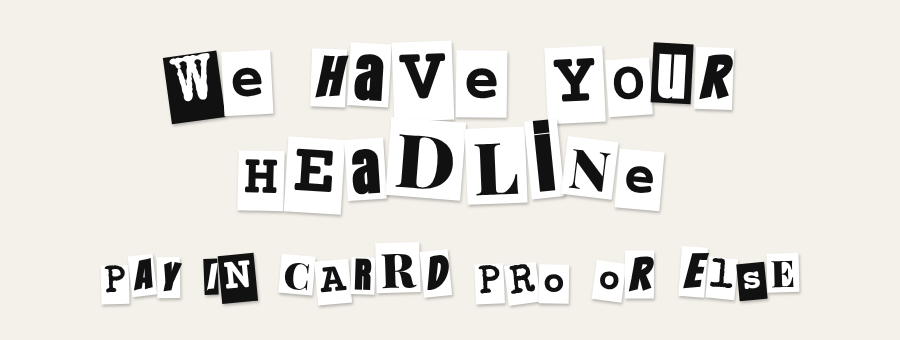
It’s a bigger sibling of our wobbly headline script – same idea, more chaos.
1. Add the code
Add an Embed element (Type: Code, Style: Hidden, location: Body End) and paste:
<link href="https://fonts.googleapis.com/css2?family=Anton&family=Special+Elite&family=Bangers&family=Playfair+Display:wght@900&family=Courier+Prime:wght@700&display=swap" rel="stylesheet">
<style>
  .ransom { word-spacing: 0.3em; }
  .ransom .word { display: inline-block; white-space: nowrap; }
  .ransom .word span {
    display: inline-block;
    padding: 0 0.1em;
    margin: 0 0.02em;
    line-height: 1.05;
    box-shadow: 1px 2px 3px rgba(0,0,0,.25);
  }
  .ransom .paper { background: #fff; color: #111; }
  .ransom .ink   { background: #111; color: #fff; }
</style>
<script>
function ransomNote(className = 'ransom', amount = 16) {
  const fonts = ['Anton', 'Special Elite', 'Bangers', 'Playfair Display', 'Courier Prime'];
  const pick = list => list[Math.floor(Math.random() * list.length)];
  document.querySelectorAll('.' + className).forEach(el => {
    const words = el.textContent.trim().split(/\s+/);
    el.innerHTML = '';
    words.forEach((word, i) => {
      const w = document.createElement('span');   // keeps each word on one line
      w.className = 'word';
      [...word].forEach(ch => {
        const s = document.createElement('span');
        s.textContent = Math.random() < 0.6 ? ch.toUpperCase() : ch;
        s.className = Math.random() < 0.3 ? 'ink' : 'paper';
        s.style.fontFamily = pick(fonts);
        s.style.fontSize = (85 + Math.random() * 35) + '%';
        s.style.transform = `rotate(${(Math.random() - 0.5) * amount}deg)`
                          + ` translateY(${(Math.random() - 0.5) * amount * 0.4}px)`;
        w.appendChild(s);
      });
      el.appendChild(w);
      if (i < words.length - 1) el.appendChild(document.createTextNode(' '));
    });
  });
}
document.addEventListener('DOMContentLoaded', () => ransomNote());
</script>
2. Tag your headline
Select the Text element, go to Settings → Advanced → Classes and add ransom. One script, as many ransom headlines as you like.
Same Pro Plus note as above: no Advanced Settings on Pro Standard, so replace '.' + className in the querySelectorAll line with your element’s ID, e.g. '#text02'.
3. Make it yours
- Fonts: the
fontslist is any Google Fonts you like. Mix a heavy sans (Anton), a typewriter (Special Elite), a comic font (Bangers), a fat serif (Playfair Display) and a monospace (Courier Prime) and you get the newspaper mix. Swap them out, but keep the<link>line in sync. - Chaos:
amountcontrols rotation.8is tidy,16is the default,30is unhinged. - Colors: change
.paperand.ink. Old newsprint is#f4f1eawith#222text. Neon pink on black also works, we don’t judge. - Ratio of inverted letters: the
0.3inMath.random() < 0.3– set it to0for all-white scraps.
ℹ️ The layout is random on every page load. Every visitor gets a slightly different note, which is kind of the point.
Font file or script?
| Real font file | Generator script | |
|---|---|---|
| Setup | Host a file + a few lines of CSS | Paste one Embed element |
| Look | Authentic cut-out letters | Convincing, uses Google Fonts |
| Same on every visit | Yes | No, re-shuffled on each load |
| Body text | Fine for short paragraphs | Headlines only |
| Screen readers | Read the text normally | May read letter by letter |
| Carrd plan | Pro Standard (Pro Plus for per-element styles) | Pro Standard (Pro Plus for classes) |
Our take: script for one or two headlines, real font if the ransom look is your whole brand.
Three tips before you publish
- Keep it short. Ransom fonts are for 2–6 words, not for your About section. Pair them with a plain body font – Inter, Nunito or anything from our elegant Carrd fonts list.
- Mind the contrast. Cut-out letters on a busy background image get unreadable fast. Plain paper tones (
#f4f1ea) or solid dark backgrounds work best. - Check mobile. Big cut-out letters wrap differently on a phone. Set a smaller font size for mobile in the element’s settings and look at it on your actual phone.
TL;DR
Google Fonts has no ransom note fonts, so Carrd’s picker can’t help. Either upload a free font file to GitHub, load it in a hidden Embed element with @font-face and apply it in the element’s Styles – our pick is Ransom by Divide By Zero, and watch the license on Earwig Factory – or paste the generator script above into a Body End Embed and give your headline the class ransom. Both need Carrd Pro.
Want more text effects? See our gradient text styles and the wobbly headline mini plugin. And if custom classes are new to you, Carrd element styles is a good next read.
Check out more tips and tricks on our Carrd Blog.